AI Testing Tools for Software QA: What to Automate and How to Choose
AI testing tools can generate tests, navigate applications, compare interfaces, maintain automation, or help explain failures. Those jobs are not interchangeable. The right choice depends on what your team wants to automate, what must remain deterministic, who will maintain the coverage, and what evidence people need when a test fails.
The short answer is that there is no single best AI testing tool for every software QA team.
A team that wants test code in its repository may need Playwright plus an AI coding assistant. A manual QA team may prefer a managed platform with plain-language authoring. A design system may need visual AI. A team building an AI agent needs evaluations and scoring. A product team protecting critical workflows after deployment may need a separate post-deploy QA layer.
This guide gives you a framework for choosing between those categories without treating every product that uses AI as a substitute for every other one.Disclosure: AlwaysQA publishes this guide and is included in the comparison. The descriptions of other products are based on their public documentation, reviewed on September 2, 2026. We have not independently tested every product or every plan. Capabilities and pricing change, so verify important requirements with each vendor before buying.What are AI testing tools?
AI testing tools apply model-driven techniques to one or more parts of the software testing lifecycle. They may turn natural-language intent into test steps, choose how to navigate a browser, identify visual differences, adapt to interface changes, analyze failures, or prioritize what should run.
That definition covers several different markets.Category
What AI helps automate
Typical output
Representative optionCode-first browser testing
Test generation assistance around engineered automation
Test code, assertions, traces, reports
Playwright with a coding assistantManaged AI test authoring
Creating and maintaining tests from natural language or recorded flows
Platform-managed test cases and results
mablVisual AI testing
Comparing rendered interfaces and identifying meaningful visual changes
Visual checkpoints, baselines, and diffs
ApplitoolsAI and agent evaluation
Scoring model outputs, tool calls, trajectories, and production traces
Datasets, experiments, scores, and traces
BraintrustAgent-first post-deploy QA
Attempting saved customer workflows and returning evidence after deployment
Outcomes, observations, action timeline, and replay
AlwaysQAThese products should not be ranked as though they solve the same problem. The useful question is not “Which tool has the most AI?” It is “Which testing job are we asking AI to perform?”
AI software testing is not the same as testing an AI agent
The phrase “AI testing” is ambiguous.
AI software testing uses AI to help test a conventional product: a SaaS dashboard, ecommerce checkout, account portal, form, or browser workflow.
AI agent testing evaluates an agentic system itself. It examines whether the agent selected the right tool, supplied valid arguments, followed an acceptable path, reached the intended outcome, and stayed within safety boundaries across repeated runs.
Braintrust describes agent evaluation as testing both the final task result and the sequence of decisions and tool calls that produced it. That work needs datasets, scorers, repeated trials, and trace analysis—not only browser checks. See Braintrust's guide to agent evaluation.
AlwaysQA currently belongs to the first category. It uses an AI-guided browser agent to verify critical workflows in a web application. It is not an evaluation platform for testing the reasoning quality, safety, or tool-use accuracy of your own AI agent.
Start with the testing job, not the tool category
Before comparing AI quality assurance tools, write down the result you need.If your main need is...
Start by evaluating...
WhyEngineers owning precise browser tests in Git
Playwright and AI-assisted code generation
The team controls the code, assertions, fixtures, CI behavior, and review process.Non-engineers creating repeatable tests in plain language
Managed AI test-authoring platforms
The platform reduces the amount of test code the team must write and maintain directly.Detecting layout, rendering, and cross-browser visual regressions
Visual AI platforms
Functional assertions often miss changes that are obvious to a person looking at the page.Evaluating an LLM application or autonomous agent
AI evaluation platforms
Probabilistic outputs and tool-using trajectories require scoring, datasets, and repeated trials.Checking whether a critical customer journey still works after deployment
Post-deploy browser QA
The valuable output is a durable result and failure evidence tied to the released application.One team may need more than one category. A Playwright suite, visual checkpoints, API contract tests, accessibility checks, and post-deploy critical-flow verification can coexist because they answer different questions.
The best AI testing tools depend on what you want to own
Ownership is one of the biggest differences between AI testing tools.
Playwright: own the test code and execution model
Playwright Test is a code-first end-to-end framework. It includes a test runner, assertions, isolation, parallel execution, and tooling for Chromium, Firefox, and WebKit.
Playwright itself is not an AI testing tool. A coding assistant can help generate or update Playwright tests, but your team still owns the resulting files, fixtures, selectors, assertions, CI configuration, and maintenance.
Choose this approach when:test code must live in the repository;
engineers need precise control over network behavior, fixtures, and assertions;
tests must run on pull requests or act as CI release gates;
you need broad, deterministic coverage maintained as software;
framework portability matters more than avoiding test code.The trade-off is ownership. Generated code still requires review. A plausible test can assert the wrong outcome, mock away the failure you needed to catch, or pass without proving the customer result.
mabl: use AI to accelerate managed test creation
mabl's public documentation says its Test Creation Agent can generate browser, mobile, and API test steps from natural-language intent. For browser tests, it can build steps, reuse existing flows, and add visual assertions. See mabl's Test Creation Agent documentation.
Choose a managed authoring platform when:manual testers or product specialists need to contribute automation;
reducing code-level authoring is more important than owning framework-native files;
the team wants creation, execution, maintenance, and reporting in one product;
web, mobile, or API coverage should share a managed workflow.The trade-off is platform dependence. Ask what can be exported, how test logic is versioned, which parts require human completion, and what happens to the suite if you stop using the service.
Applitools: add visual AI where DOM assertions are insufficient
Applitools focuses on visual validation and offers both framework integrations and no-code test authoring. Its documentation describes SDK support for Playwright and other frameworks, visual checkpoints, cross-browser rendering, and AI-assisted maintenance. See the Applitools SDK overview and Visual AI execution overview.
Choose visual AI when:visual regressions are expensive or common;
the same interface must render correctly across browsers and viewports;
component and design-system changes create noisy pixel comparisons;
you want to add visual checkpoints to an existing Playwright suite.The limitation is scope. A visual checkpoint can prove that a screen changed or looks wrong. It does not automatically prove that the underlying business transaction completed, the correct record was stored, or a downstream system received the expected event.
Braintrust: evaluate AI applications and agents
Braintrust is an evaluation and observability platform for LLM applications and agents. Its experiments combine test data, a task, and scorers, and its agent-evaluation guidance covers multi-step decisions, tool calls, outcomes, and repeated trials. See the Braintrust experiments documentation.
Choose an AI evaluation platform when:the system under test is an LLM application or AI agent;
outputs may be valid without being identical;
you need scored datasets, experiment comparisons, or production traces;
tool choice, argument construction, safety, and trajectory quality matter.This category is not a substitute for conventional software QA. An agent can score well while the checkout page it depends on is broken. The deterministic code and user-facing application still need their own tests.
AlwaysQA: verify critical flows after the coding agent ships
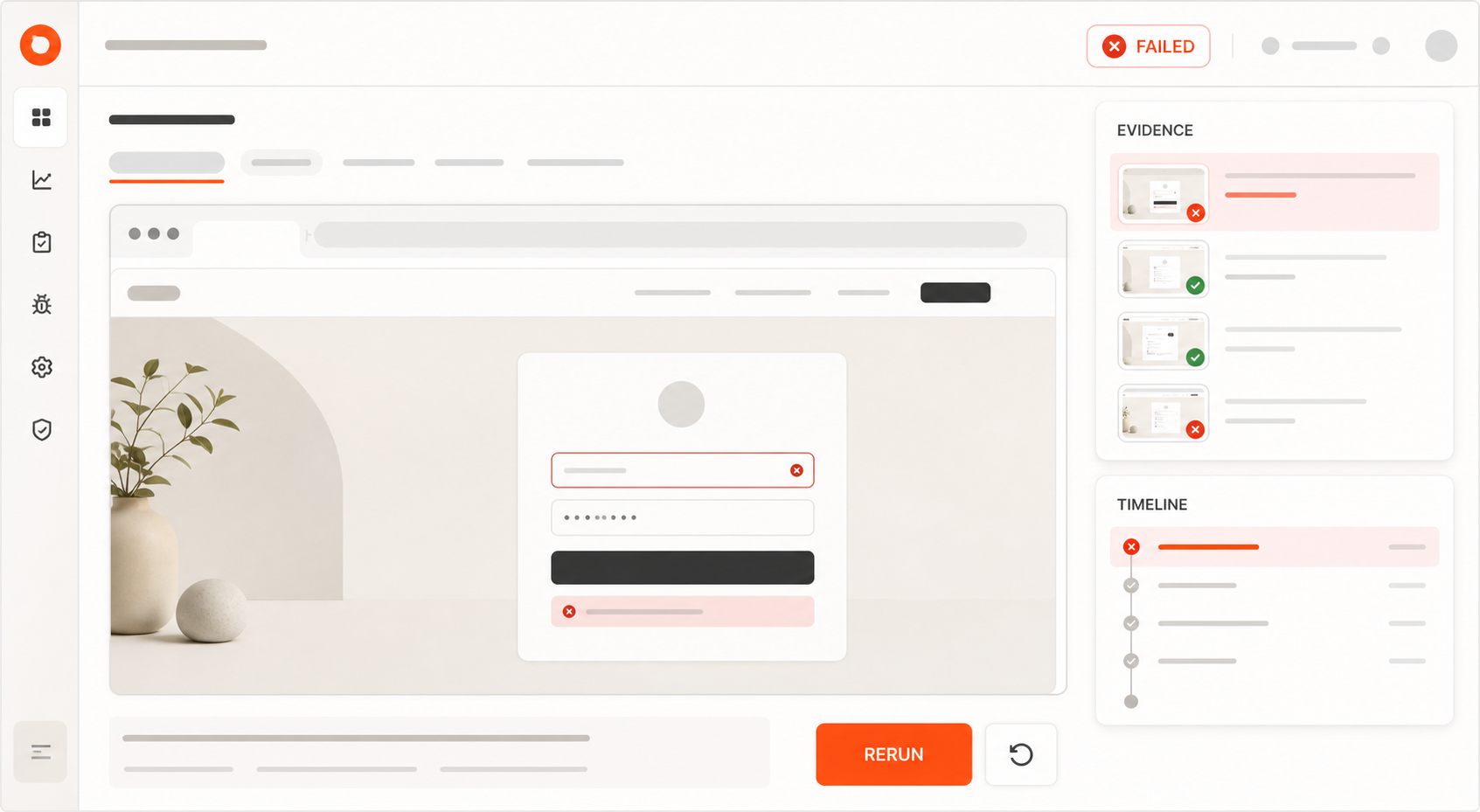
AlwaysQA is an agent-first MCP QA service for developers and product owners. You define a browser Test Case in plain language with a starting URL, workflow, and observable Success Condition. A fresh AI-guided agent attempts the flow in a managed browser on demand or on a Daily or Weekly schedule.
Each finished Run returns one of three Outcomes—Passed, Failed, or Needs Attention—with structured Evidence such as a summary, observations, an action timeline, and a temporary browser replay when available. A connected coding agent can create and manage Test Cases, start Runs, inspect Evidence, and bring failure context back to the fix.
Choose AlwaysQA when:a coding agent needs a QA-specific MCP workflow rather than generic browser controls;
a small set of customer-critical web journeys must be checked after deployment;
developers and product owners want plain-language Test Cases instead of fixed scripts;
the team needs a durable Run record and evidence-backed handoff;
on-demand, Daily, or Weekly browser verification fits the detection window.AlwaysQA is not the right choice when:you need repository-owned Playwright test files;
every browser path must follow exactly the same scripted steps;
you need unit, component, load, penetration, native-mobile, or pixel-baseline testing;
you need high-frequency uptime monitoring or minute-level incident paging;
you are evaluating the reasoning and safety of your own AI agent;
you expect one tool to prove that the complete product is bug-free.AlwaysQA also requires maintenance. Teams still need to keep Success Conditions meaningful, QA Accounts usable, test data safe, and critical-flow coverage aligned with the product. Agent-guided navigation removes fixed-script maintenance; it does not remove QA ownership.
Explore how AlwaysQA works or review its browser QA features.
AI testing tools that work alongside Playwright
Playwright teams do not need to replace their framework to benefit from AI test automation.
AI can support a Playwright workflow in four different ways:Generate test code. A coding assistant drafts Playwright files, fixtures, and assertions for engineers to review.
Add visual validation. A service such as Applitools adds visual checkpoints and cross-browser comparison around existing tests.
Manage adjacent coverage. A platform can own tests that do not need to live as Playwright code in your repository.
Verify after deployment. AlwaysQA can independently attempt a saved critical flow in the deployed application and return the result through MCP.That last distinction matters. A Playwright test proves that its scripted assertions passed in the environment and configuration where it ran. A post-deploy Run asks whether the customer-level Success Condition can be observed in the deployed product. The two signals can reinforce each other without pretending to be identical.
AlwaysQA does not currently generate or export Playwright test files. If owning .spec.ts files is a requirement, choose a code-generation workflow or a platform that explicitly supports that output. Use AlwaysQA as an additional post-deploy check, not as a disguised Playwright replacement.
For ideas you can adapt into engineered coverage, see the Playwright test generation prompt library.
A transparent comparison of representative tools
This table compares the job each product is best positioned to do. It is not a hands-on ranking, and the products are not direct substitutes.Option
Primary job
What the team owns
Strong fit
Important limitationPlaywright
Code-first browser automation
Test code, fixtures, assertions, CI, and maintenance
Engineering teams that need control and repository-owned coverage
Requires test-engineering skill and ongoing code maintenance; it is not AI by itselfmabl
AI-assisted managed test creation and execution
Test intent, review, platform configuration, and ongoing suite decisions
Cross-functional teams that want natural-language assistance across managed testing workflows
Portability and behavior depend on the platform; verify export and versioning requirementsApplitools
Visual AI and cross-browser visual validation
Baselines, approval policy, integration, and review decisions
Teams where visual correctness and rendering differences are release-critical
Visual evidence alone does not prove every business outcomeBraintrust
Evaluation of LLM applications and agents
Datasets, tasks, scorers, thresholds, and review policy
Teams testing probabilistic outputs, tool use, and agent trajectories
Not a replacement for functional browser, API, or unit testingAlwaysQA
Agent-first post-deploy critical-flow verification
Workflow intent, Success Conditions, QA Accounts, and response to Evidence
Developers and product owners using coding agents to protect important web journeys
Does not export Playwright code or replace broad deterministic test suites and specialist testingTen criteria for evaluating AI quality assurance tools
Product demos tend to show the test being created. Buying decisions should focus on the full operating loop.
1. What is the unit of automation?
Is the durable asset a code file, a recorded path, a plain-language Test Case, a visual baseline, or an evaluation dataset? That choice determines who can review it, version it, and repair it later.
2. How is success defined?
Look for explicit assertions, observable Success Conditions, visual approval rules, or scoring thresholds. “The agent completed the task” is not useful unless the product shows what evidence supports that conclusion.
3. Is execution deterministic, adaptive, or both?
Deterministic scripts are easier to reproduce but can be brittle. Adaptive agents can navigate changing interfaces but may take different paths. Neither model is always better. The tool should make uncertainty visible instead of quietly converting it into a pass.
4. What evidence survives a failure?
Ask whether you receive logs, screenshots, traces, observations, network details, action timelines, visual diffs, or replay. Then ask how long each artifact is retained and whether it can be shared safely with a developer.
5. Who maintains the tests?
AI does not eliminate maintenance. Someone still owns obsolete flows, changed requirements, credentials, test data, baselines, flaky infrastructure, and false confidence caused by weak assertions.
6. Can you export what you create?
If portability matters, verify whether the tool exports readable framework-native code, a documented data format, reports only, or nothing reusable outside the platform.
7. Where can tests run?
Check browser and device coverage, CI support, staging and production access, private-network requirements, geographic execution, and whether the tool can safely reach authenticated areas.
8. How are credentials and test data handled?
Use dedicated QA accounts and synthetic data. Ask how secrets are stored, whether they enter model context, what appears in screenshots and replay, and what is excluded from exported evidence.
9. What triggers execution?
Pull-request checks, deployment hooks, manual Runs, schedules, and production monitoring answer different questions. Match the trigger and frequency to the cost of detecting a failure late.
10. How is usage priced?
Compare total operating cost, not the entry price. Include test creation, execution allowances, parallelism, browsers, visual checkpoints, seats, retention, maintenance time, and overage behavior.
A practical two-week pilot
Do not evaluate an AI testing tool with a polished vendor demo. Use one workflow your own team understands.Choose a valuable flow. Login, checkout, onboarding, billing, permissions, or another journey where failure has a clear cost.
Write the expected outcome. Define what must be observable for the test to pass.
Create the coverage. Measure the time and expertise required, including credentials and test data.
Run the healthy version. Confirm the tool can reach the result without manual rescue.
Introduce a safe failure. Use a staging environment or controlled change and check whether the tool catches it.
Give the result to a developer. Measure whether the evidence identifies a useful investigation boundary.
Change the interface without changing the outcome. See whether the test survives and whether any adaptation remains trustworthy.
Review maintenance and cost. Estimate the monthly work and usage required for the coverage you actually need.Score the pilot on detection quality, false passes, false failures, time to diagnosis, maintenance effort, portability, security, and total cost. A tool that creates a test in thirty seconds but produces ambiguous failures may save less time than a slower tool with evidence developers can act on.
How to choose your AI test automation stack
Use the smallest combination that covers the risks your team actually owns.Choose Playwright when engineers need deterministic, repository-owned browser automation.
Add visual AI when layout and rendering are part of the acceptance criteria.
Choose a managed AI authoring platform when more people need to create and maintain tests without working primarily in code.
Choose an AI evaluation platform when the system under test is an LLM application or agent.
Add AlwaysQA when a coding agent should be able to verify a deployed critical flow and bring Evidence back to the development workflow.The best AI software testing tools make the testing boundary clearer. They show what was tested, what success meant, what happened, and what remains outside the result.
Start with one important workflow. If AlwaysQA matches the post-deploy job in your stack, create your first Test Case and give your coding agent a QA result it can act on.